How to share an HTML file as a link (including the reports your AI agent writes)
Put the file somewhere that serves it as a web page, then send that URL. Google Drive and Dropbox links won't do it: Dropbox's help center says its shared links don't render HTML, and Google ended web hosting from Drive in 2016. Netlify Drop (drag a folder, claim the site, and make it public if your team keeps projects private), GitHub Pages (push to a repository), Claude Code artifacts (publish from the session) and a shared-folder link such as BearDrive's bdrive share all give you a URL that opens the page in a browser.
Short answer
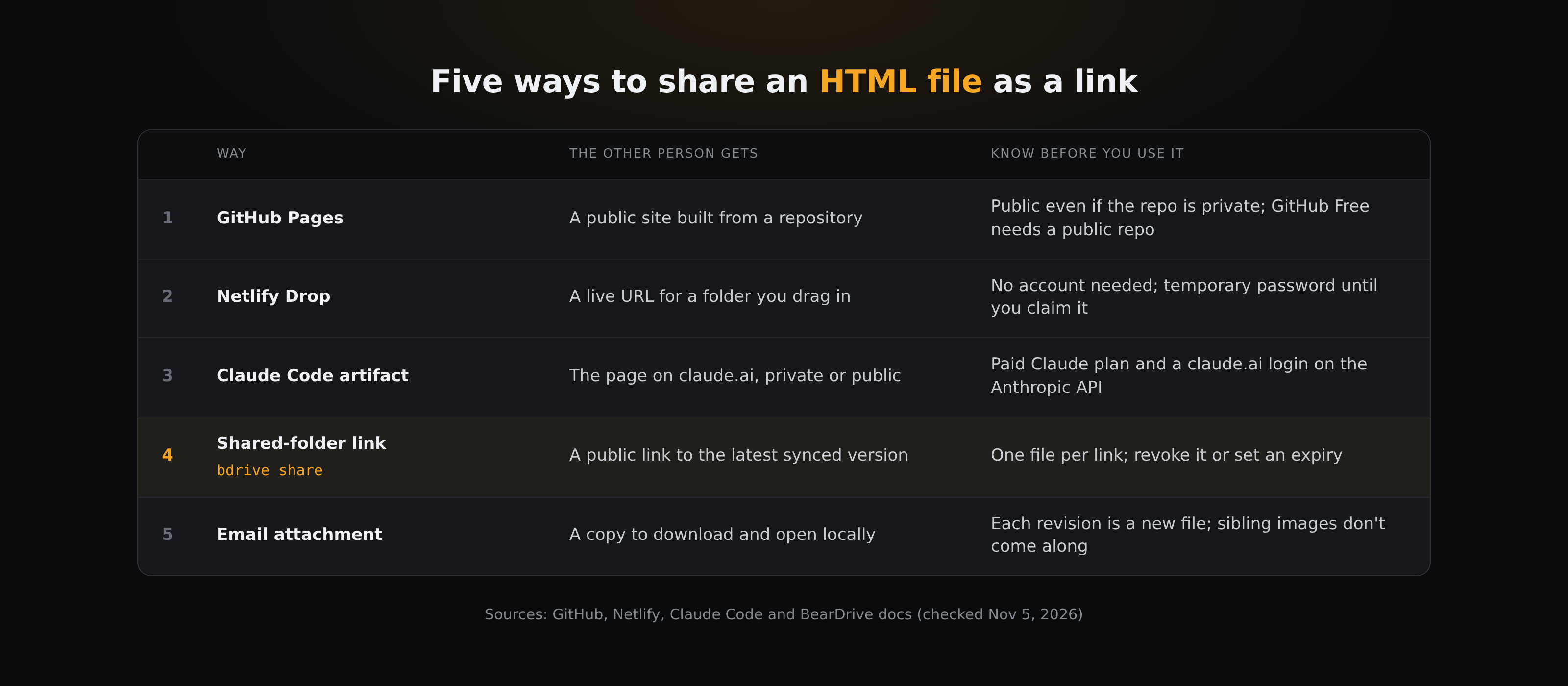
AI agents write a lot of HTML now: a research report with charts, a dashboard, a one-page proposal. On your machine it opens fine. Send it to a client and it often arrives as a wall of code or a download prompt. The fix is to put the file on something that serves it as a web page and send that link instead. Below are the five common ways to do it, each checked against its own documentation on November 5, 2026.
Why doesn't my HTML file open as a page when I share it?
A browser shows a page only when the server says "this is HTML". Drive and Dropbox don't:
- Dropbox. Its help center says plainly: "Shared links don't render HTML content in a web browser" (Dropbox Help).
- Google Drive. Google deprecated web hosting in Drive on August 31, 2015 and stopped serving content through
googledrive.com/hoston August 31, 2016 (Google Workspace Updates). A shared Drive link opens in Drive's viewer, not as your page. - Email. An attachment works if the recipient downloads it and opens it in a browser, but they get a copy: every revision is a new attachment, and anything the page loads from a neighbouring file (an image, a stylesheet) is missing unless you send that too.
So the real choice is which host to put the file on.
1. GitHub Pages: good if the file already lives in a repository
GitHub Pages publishes HTML, CSS and JavaScript files straight from a repository. Push the file, turn on Pages, and every later push updates the site; GitHub says changes can take up to 10 minutes to publish.
Two things to know before you use it for a client report:
- On GitHub Free, the repository must be public (GitHub Docs).
- GitHub's own warning: "GitHub Pages sites are publicly available on the internet, even if the repository for the site is private." Anyone with the URL can read the page.
It fits reports that are meant to be public, or teams that already keep their docs in Git.
2. Netlify Drop: the fastest one-off link
Netlify Drop takes a folder you drag onto app.netlify.com/drop and gives you a live URL, with no account required. If you drop without signing in, the files are published as-is and the URL is protected with a temporary password until you claim the site by signing up or logging in. After you claim it, whether the link is public depends on your Netlify plan and team settings. To update it, drag the changed folder onto the Production deploys area of the project dashboard (after you've claimed the site).
Netlify says deploys under 50 MB work best. Because you drop a whole folder, a page that loads images or stylesheets from sibling files works here as long as they are in the folder.
3. Claude Code artifacts: if Claude made the page in a session
If the HTML came out of a Claude Code session, Claude can publish it as an artifact: a page on claude.ai that is private to you until you share it, and that updates in place when Claude republishes. You can share it with people in your organization (Team and Enterprise) or as a public link that anyone can open without signing in.
The limits come from how artifacts are hosted:
- Artifacts need a Pro, Max, Ultra, Team or Enterprise plan and a session signed in to claude.ai on the Anthropic API. Sessions using an API key, a gateway token, Amazon Bedrock, Google Cloud's Agent Platform or Microsoft Foundry can't publish, among other requirements.
- On Team and Enterprise, public sharing is off until an Owner turns it on.
- Each artifact is one self-contained page. External images are blocked, scripts can come only from five public CDNs, and relative links don't resolve.
That makes artifacts a natural fit for "show this result to someone" straight from the session, less so for a file another tool or another agent wrote.
4. A shared-folder link: if your agents already write to a synced folder
If your agents save their output to a shared folder, the file can get a link where it already sits. In BearDrive that is one command:
bdrive share reports/q4-review.html
It prints a URL that anyone can open with no account, and HTML renders as a real page (BearDrive README). Because the agent writes into a synced folder, it doesn't matter which agent made the file: Claude Code, Codex, Cursor or a script.
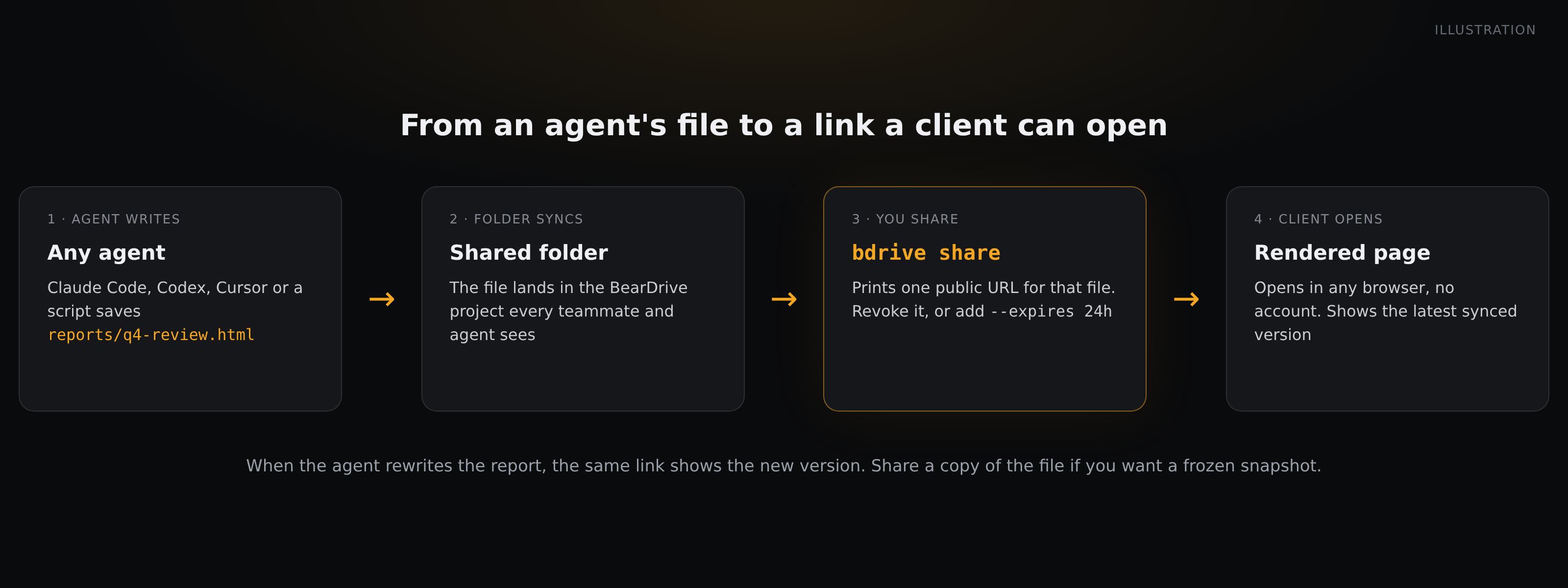
How the link behaves:
- It always shows the latest synced version. When the agent rewrites the report, the same URL shows the new one. That suits a living report; if you want a frozen snapshot, share a copy of the file.
- It lives until you revoke it or it expires.
bdrive share --listshows the project's links,--revokeends one, and--expires 24hmakes a link that stops working on its own. The Share button in the web app can set 24 hours, 7 days or 30 days on a link without changing the URL. - It is one file. There is no folder link, so a page that loads
./chart.pngfrom a sibling file won't find it. Keep the report self-contained (more on that below). - Scripts run. Chart libraries load, but a page that depends on its own login won't work through a share link.
For teammates you don't need a public link at all. bdrive url --sync reports/q4-review.html gives a link that opens only for people signed in to your hub and in the project's organization, and they can leave comments right on the rendered HTML page. An agent can then read those comments with bdrive comments and work through them.
5. Just attach it
For one person, one time, an attachment is fine. Ask them to download the file and open it in a browser rather than in the mail preview. Send a self-contained file, and expect to send a new attachment for every revision.
Before you share: make the page self-contained
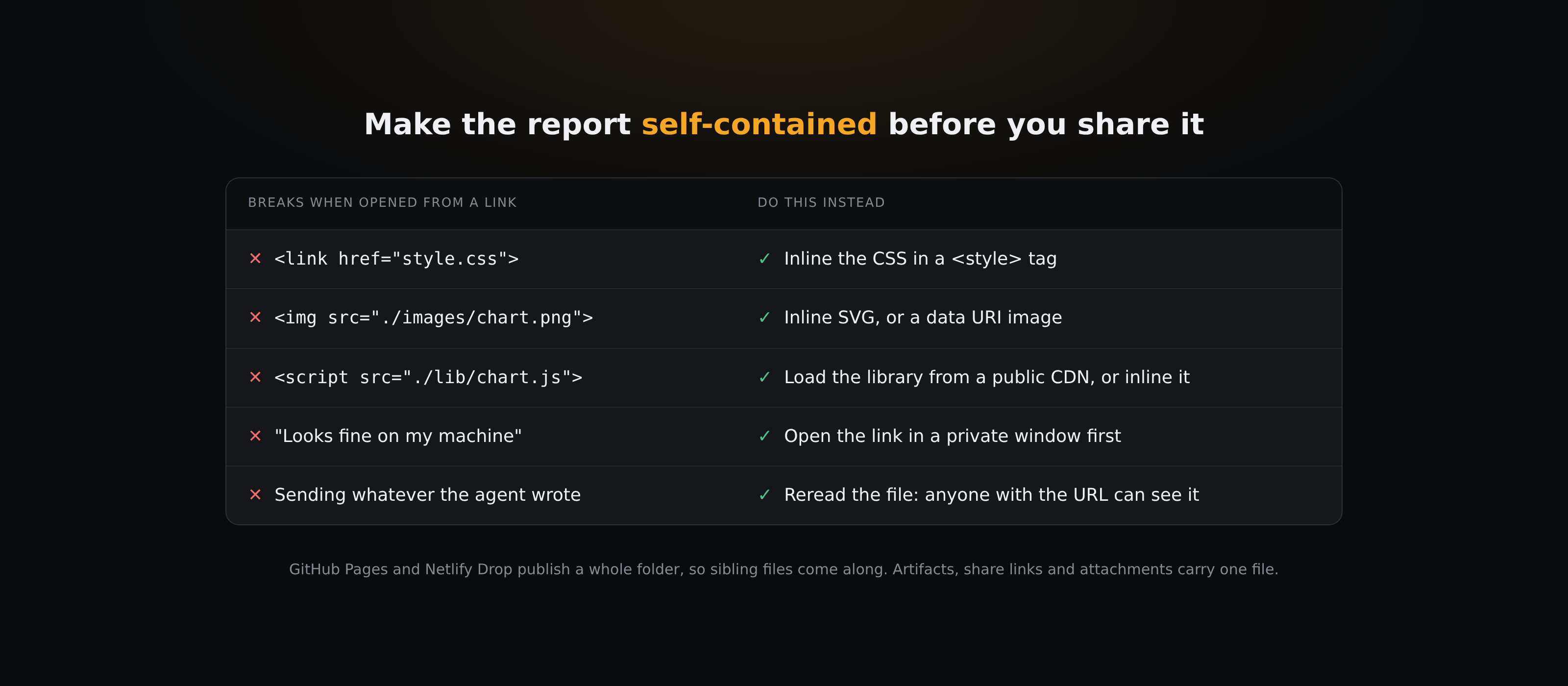
Most "it looked fine on my machine" problems come from the page reaching for files next to it. GitHub Pages and Netlify Drop publish a whole folder, so those files come along. A Claude artifact, a BearDrive share link and an attachment each carry one file, so for those:
- Inline the styles instead of linking
style.css. - Embed images as data URIs or inline SVG instead of
./images/.... Claude's artifact docs suggest the same: SVG or HTML and CSS for diagrams, data URIs for raster images. - Load libraries from a public CDN, or inline them.
- Open the link in a private window before you send it, so you see what someone without your login sees.
- Read the file once more. A public link is public to anyone who has the URL, and an agent-written report can carry more than you meant to send.
If you write the report with an agent, put those rules in its instructions (for example "produce one self-contained HTML file with inline CSS and embedded images"), so every report comes out shareable.
Which one should you use?
- A report that should be public anyway, and your docs live in Git: GitHub Pages.
- A one-off page you need to show in the next five minutes: Netlify Drop (claim the site, and check it is public, so the link opens for others).
- A result Claude just made in your session: a Claude Code artifact (public links on Team and Enterprise need an Owner to turn them on).
- Reports your agents keep writing and updating in a shared folder, for clients and teammates: a shared-folder link such as
bdrive share. - One file for one person: attach it.
Questions
- Can I share an HTML file from Google Drive as a web page?
- Not any more. Google stopped serving web content from Drive on August 31, 2016. A shared Drive link opens in Drive's viewer, not as your page. Put the file on a host that serves HTML, such as GitHub Pages or Netlify Drop.
- Why does my Dropbox link show HTML code instead of the page?
- Dropbox's help center says its shared links don't render HTML content in a web browser. Use a static host or a sharing tool that serves HTML as a page.
- How do I share an HTML report from Claude Code?
- Ask Claude to publish it as an artifact, then use Share in the page header. That needs a paid Claude plan and a claude.ai login on the Anthropic API. If the file is in a BearDrive folder, bdrive share <file> gives a public link instead, whichever agent wrote it.
- Will charts and JavaScript work when I share an HTML file as a link?
- On a static host such as GitHub Pages or Netlify, yes. Claude artifacts allow scripts from five public CDNs. BearDrive share links run the page's scripts, so chart libraries work, but a page that depends on its own login won't.
- How do I stop a shared HTML link from working?
- It depends on the host: unpublish the GitHub Pages site, delete the site in Netlify, change or delete the artifact's sharing, or run bdrive share --revoke <link> for a BearDrive link. A BearDrive link can also be made to expire with --expires.