How to undo Claude Code changes: /rewind, checkpoints, Git and file history
Run /rewind, or press Esc twice on an empty prompt, pick the prompt you want to go back to, and choose Restore code, Restore conversation, or both. Checkpoints cover edits made by Claude's file editing tools in that session. Files changed only by Bash commands, many subagent edits, and edits from other sessions or from you outside Claude Code are usually not restored. Claude Code's docs point to version control such as Git for Bash-only and subagent changes. Use Git for code in a repository, and for docs and notes outside Git, a folder that keeps its own file history, such as BearDrive's bdrive restore.
Short answer
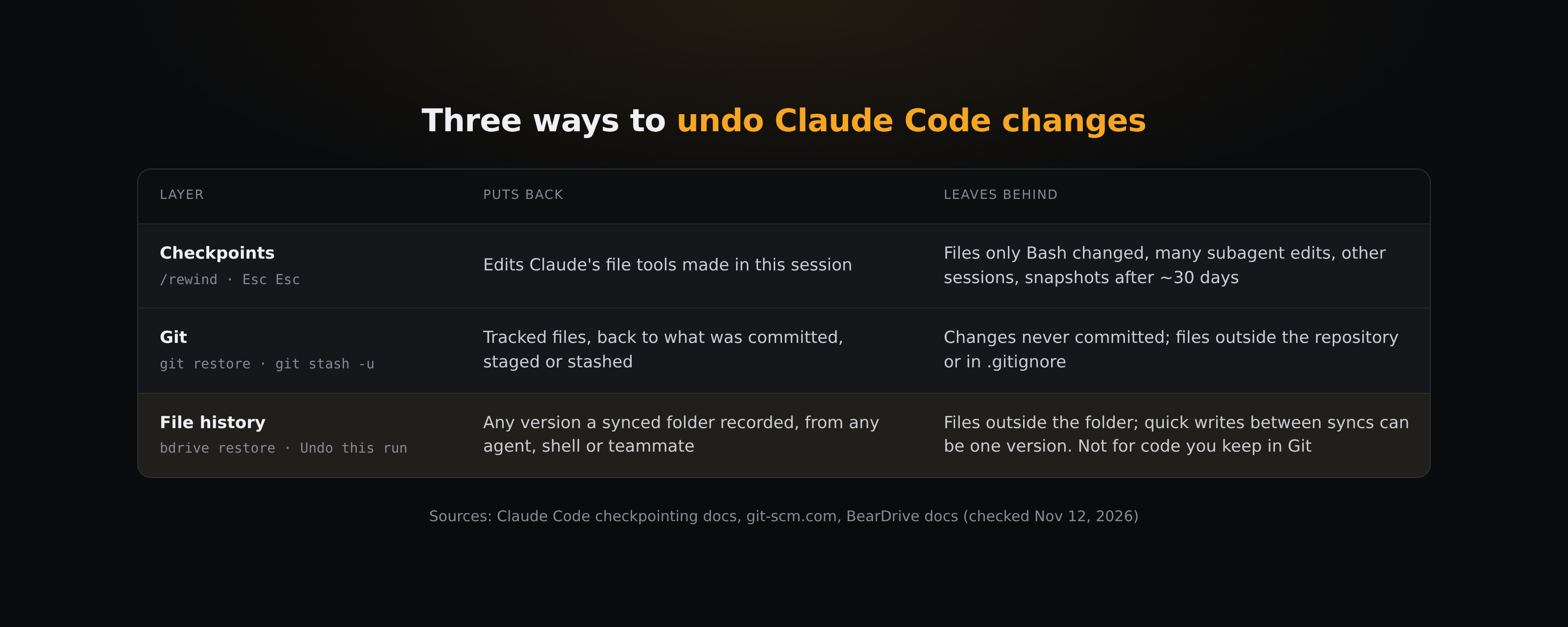
Claude Code has an undo built in: checkpoints, opened with /rewind. It is a quick way back from a bad turn, mainly for changes Claude's file tools made in that session. It also has limits that Claude Code's own documentation spells out. This guide covers how /rewind works, what it leaves behind, and the two tools that pick up the rest: Git for code, and file history for the documents your agents write outside a repository. Everything below was checked against the current docs on November 12, 2026.
How do I undo Claude Code's last change?
Run /rewind, or press Esc twice when the prompt input is empty (Claude Code docs). The menu lists the prompts you sent in the session. Pick the point you want, then choose:
- Restore code and conversation: files and conversation both go back to that point.
- Restore conversation: the conversation goes back, your files stay as they are now.
- Restore code: the files go back, the conversation stays.
- Summarize from here or Summarize up to here: compress part of the conversation to free context. Files on disk don't change.
A few details that matter when you rely on it:
- Every prompt that starts a turn creates a checkpoint. Claude Code keeps file snapshots for the 100 most recent checkpoints in a session.
- Checkpoints are saved with the conversation, so
/rewindstill works after you resume a session. - Snapshots are deleted in Claude Code's retention sweep, by default about 30 days after the session last saved one. Rewinding to a checkpoint whose snapshots are gone can fail with "No files were restored". The
cleanupPeriodDayssetting keeps them longer. - The two code options appear only when that checkpoint has tracked file changes.
To branch off and try a different approach while keeping the original session intact, the docs point to /branch or claude --continue --fork-session.
What doesn't /rewind undo?
The checkpointing docs list these gaps (Claude Code docs):
- Files that only Bash commands changed. Checkpoints track Claude's file editing tools. Once Claude has edited a file with those tools,
/rewindalso undoes later Bash changes to that file. A file that only shell commands touched, for example one rewritten bysed -i, a formatter or a script Claude ran, isn't tracked and stays as it is. - Many subagent edits. A forked skill running in the foreground edits during your turn, so rewinding restores it. Other subagents, including forked skills running in the background (the default) and a background
/code-review --fix, can leave edits that rewinding doesn't restore. - Changes from outside the session. Edits you make by hand outside Claude Code and edits from other concurrent sessions are normally not captured, unless they touch the same files as the current session.
- Symlinked and hard-linked files. A restore skips them and warns
Restored the code, but skipped N files. - Messages sent mid-turn. A message you typed while Claude was working can be marked "No code restore"; restore from the prompt that started that turn instead.
- Old sessions. After the retention sweep, the snapshots are gone.
The docs sum it up themselves: checkpoints are for quick, session-level recovery, and for permanent history you should keep using version control such as Git.
How do I revert what /rewind can't reach?
If the files are in a Git repository, Git is the next layer:
git statuslists modified, staged and new untracked files, andgit diff(plusgit diff --staged) shows the line changes to tracked files, whatever made them: Claude, a shell command, a subagent or you. Files your.gitignoreexcludes don't show up.git restore <path>discards unstaged changes to a tracked file (git-restore). To go all the way back to the last commit, usegit restore --source=HEAD --staged --worktree <path>. The discarded changes are gone, so look at the diff first. New files an agent created aren't touched; delete them by hand or withgit clean(preview first withgit clean -n; by default it refuses to delete unless you pass-for-i).git stash -usets uncommitted changes aside, including new untracked files, so you can get them back later withgit stash pop(git-stash). Plaingit stashleaves untracked files in place.
Git can only return you to a state someone committed, staged or stashed. A habit that makes it work well with an agent: commit before a prompt that will touch many files. Then you can see a bad run with git status and git diff and undo it with git restore --source=HEAD --staged --worktree <path> for the files you want back (plus git clean for new files), even if half of it happened through Bash.
What about files that aren't in Git?
Agents also write files that aren't code in a repository: specs, meeting notes, research, memory files, client reports, a team wiki, sometimes in a folder that several people's agents share. Checkpoints still cover what Claude edits with its file tools in your current session, but not what another session, another agent or a teammate wrote. Git helps only if those files live in a repository and someone commits them, and it can only take you back to what was committed, staged or stashed.
That layer needs a folder that keeps history by itself. BearDrive, which we make, is one option: it syncs a folder between teammates and agents and keeps the history of every file in it, whether the change came from Claude, a Bash command, another agent or a teammate on another machine, as long as BearDrive is syncing that device.
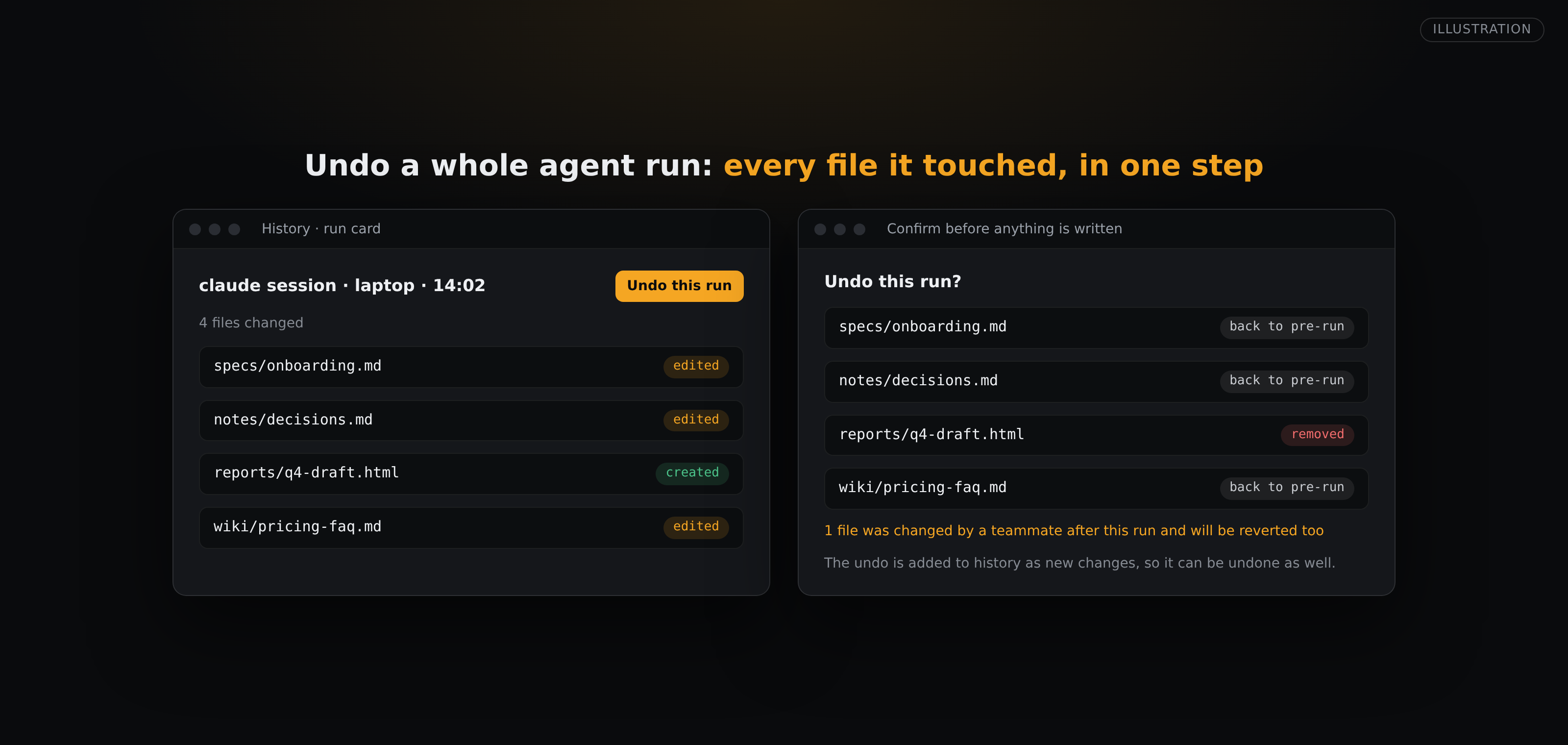
bdrive logshows which account changed which file, when, and from which device.bdrive restore <file>puts the previous version back.bdrive restore --list <file>lists the versions, andbdrive restore <file> <version>picks one. The restore is recorded as a new change, so nothing is erased, and it reaches every synced device like any other edit.- In the hub's History view, the changes from one agent session are grouped into a run card (the session id comes from the agent hook that
bdrive initinstalls; Codex needs its experimental hooks turned on, and per-session detail is kept 30 days by default). Undo this run puts back every file that run touched: edited files return to their content from just before the run, and files it created are removed. The confirm lists every path before anything is written, including files someone changed after the run, which are reverted too. It needs write access on the project. - Agents connected to a project through BearDrive's remote MCP server have
historyandrestoretools, so you can ask the agent itself to put yesterday's version back (on BearDrive Cloud; a self-hosted hub has MCP off until you enable it).
Two limits to know. File history covers only files inside the synced folder and not ones excluded by .bdriveignore. And BearDrive records a version each time it syncs a change, so several quick writes between syncs can arrive as one version. For code, keep using Git; file history is for the files Git doesn't hold.
A routine that covers all three
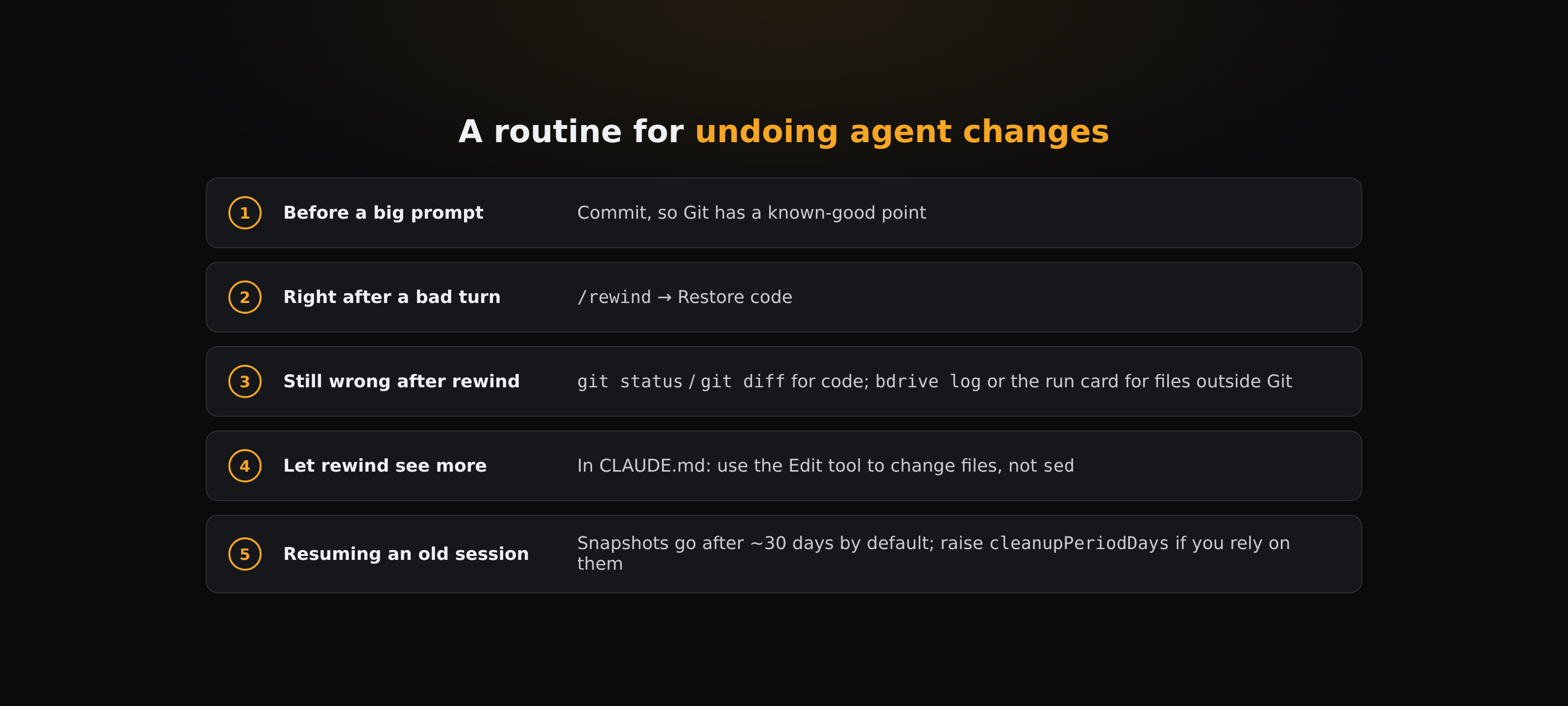
- Before a big prompt: commit, so Git has a known-good point.
- Right after a bad turn:
/rewind, then Restore code. - If something is still wrong after the rewind: run
git diffto find what Bash or a subagent changed. For files outside Git, checkbdrive logor the run card. - Prefer file tools to shell edits. If you want
/rewindto cover more, add a line toCLAUDE.mdsuch as "use the Edit tool to change files, notsed", because files changed only through Bash aren't tracked. - Resuming an old session: checkpoints older than the retention window may be gone. Raise
cleanupPeriodDaysif you rely on them.
Which one should you use?
- Undo the last turn or two in this session:
/rewind. - Code changed by a shell command, a background subagent, another session, or a session past the retention window: Git.
- Docs, notes and memory outside Git, especially when several agents or teammates write them: a synced folder's file history, such as
bdrive restoreor Undo this run.
Questions
- How do I undo in Claude Code?
- Run /rewind, or press Esc twice on an empty prompt. Pick the prompt you want to return to and choose Restore code, Restore conversation, or Restore code and conversation.
- Can /rewind undo changes made by Bash commands?
- Only for files Claude had already edited with its file editing tools in that conversation. A file that only Bash commands changed isn't tracked and stays as it is. Claude Code's docs recommend version control such as Git for those.
- How long do Claude Code checkpoints last?
- Claude Code keeps file snapshots for the 100 most recent checkpoints in a session, and deletes a session's snapshots about 30 days after the session last saved one. The cleanupPeriodDays setting changes that.
- Does /rewind undo a subagent's edits?
- A forked skill running in the foreground, yes. Other subagents, including background forked skills, can leave edits to files Claude hadn't edited itself, and rewinding doesn't restore those. Use Git to revert them.
- How do I undo changes to files that aren't in Git?
- You need something that keeps history for that folder. In a BearDrive folder, bdrive restore <file> puts the previous version back, bdrive restore --list <file> shows older versions, and Undo this run in the hub reverts everything one agent session changed.